 English
  Русский
How to clean a computer and laptop with compressed air
Updated:
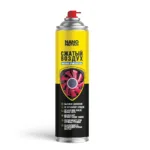
To clean a computer with compressed air, blow the dust out with a can of air, without touching the parts. Switch the computer off and unplug it 5–10 minutes before cleaning, fit the extension tube into the spray head and blow out dusty areas in short bursts from 10–15 cm. NANOPROTECH Compressed air duster suits the job: the 1 000 ml can is designed for repeated cleaning of PC cases, laptops, keyboards and office equipment.
What you need
Where the dust in a computer comes from
Fans draw air through the case to cool the processor, graphics card and power supply, and dust comes in with it. It settles on coolers, heatsinks, boards and ventilation grilles and hinders cooling: the computer runs hotter and noisier. Regular dusting helps prevent overheating and reduce noise, and removing dust extends the service life of the equipment.
How to clean a PC case with compressed air — step by step
- Switch the computer off. Shut it down and unplug the system unit 5–10 minutes before cleaning. Never blow out live equipment, and let hot parts cool: the spray strongly cools them, and a sudden temperature change can damage them.
- Prepare the workplace. Work in a ventilated room, away from open flames and hot objects. Do not smoke while cleaning.
- Fit the tube. Insert the extension tube into the spray head: it lets you direct the jet into narrow gaps.
- Open the case. Remove the side panel of the system unit to reach the coolers, heatsinks and boards.
- Blow out the dusty areas. Hold the can upright and do not shake it. In short bursts from 10–15 cm, blow out the coolers, heatsinks, boards, ventilation grilles and case corners. Hold the fans still so the jet does not spin them, and do not touch parts with the tube: the jet removes dust without contact and leaves no marks.
- Clean the keyboard. Blow dust and small debris out from under the keys in the same short bursts.
- Reassemble the computer. Refit the side panel, plug the system unit in and switch it on.
A laptop is cleaned the same way but without taking it apart, through the ventilation grilles and the keyboard. Printers, monitors and other office equipment follow the same rules: unplug them 5–10 minutes beforehand, use short bursts and keep the jet off hot parts.
Why it may not work
- The equipment was on or hot. Unplug it 5–10 minutes before cleaning: live equipment is never blown out, and sudden cooling can damage hot parts.
- The can was tilted or turned over. It holds liquefied gas, and when tilted, cold liquid comes out instead of gas. Keep the can upright. If liquid gets onto a board, do not switch the equipment on until the parts have warmed to room temperature and dried completely.
- Long blasts without the tube. Fit the tube and use short bursts from 10–15 cm.
- The laptop still runs hot after cleaning. Through the grilles and keyboard the jet removes only the dust it can reach. Dust deep in the cooling system means taking the laptop apart: a job for a service centre.
Safety precautions
- The can contains propane-butane and is flammable. Do not spray it near open flames, hot objects or live equipment, and do not smoke while working.
- Do not inhale the vapour; work in a well-ventilated room.
- Avoid static electricity.
- The can is pressurised: keep it out of the sun, do not heat it above +50 °C, and do not pierce or burn it, even when empty.
- In case of contact with eyes, rinse with water; with skin, wash with soap and water. Keep the can out of the reach of children.
Frequently asked questions
How do I clean a laptop without taking it apart?
Through the ventilation grilles and the keyboard. Switch the laptop off and unplug it 5–10 minutes beforehand, fit the tube and, holding the can upright, blow in short bursts from 10–15 cm.
How do I clean dust out of a laptop keyboard?
Switch the laptop off, fit the tube and blow dust and small debris from under the keys in short bursts from 10–15 cm. The jet leaves no marks.
How should I hold a can of compressed air?
Upright, valve up. Do not turn it over, tilt it sharply or shake it: the liquefied propane-butane inside then comes out as a liquid and sharply cools the parts.
Why is the jet from the can cold?
That is how the product works: it strongly cools the parts being cleaned. So switch equipment off 5–10 minutes beforehand to let hot parts cool: sudden cooling can damage them.
How often should I clean dust out of a computer?
Whenever dust builds up, without waiting for overheating and noise: visible dust on the grilles and coolers means it is time. Computers on the floor, in dusty rooms or in homes with pets need it more often. Compressed air for computer cleaning suits regular maintenance, and the 1 000 ml can is designed for repeated use.
More solutions
- How to fix stick drift: cleaning a controller stick with contact cleaner
- How to clean a throttle body yourself — step by step
- How to clean car upholstery yourself: seats, roof lining and carpets
- How to clean a fabric sofa at home: upholstery, stains and carpets
- How to remove rust from metal: car bodies, tools and fasteners
- How to remove a seized bolt or nut
Still have questions?
Describe your task and a NANOPROTECH technical specialist will suggest the right product and how to use it.